Does anyone make a low cost folding smart phone with a large non-folding screen? The idea would be to have a phone two screens, one in each half of a folding case, which but up against each other, when the phone is opened. The edges of the case between the two screens would be clear plastic, and slightly curved, to hide the join. The effect would be similar to the distortion you see on a phone with a folding screen, at the fold. With two rigid smaller screens, the phone would be much cheaper to make, and less subject to damage.
Showing posts with label smartphone. Show all posts
Showing posts with label smartphone. Show all posts
Wednesday, June 26, 2024

Saturday, September 11, 2021
My Phone Survived a Trip Through a Washing Machine
In July 2020, I purchased a Unihertz Atom L Rugged Smartphone
. I did not realise how rugged it was until today. My washing machine was making some banging sounds, but I did not think much of it. When I opened the door after 45 minutes, one wash cycle, two rinses and a spin dry, I found my phone in among the clothes. The phone was covered with a black grease and there was a spot warn shiny on the brushed aluminum case. But it was still turned on and working.
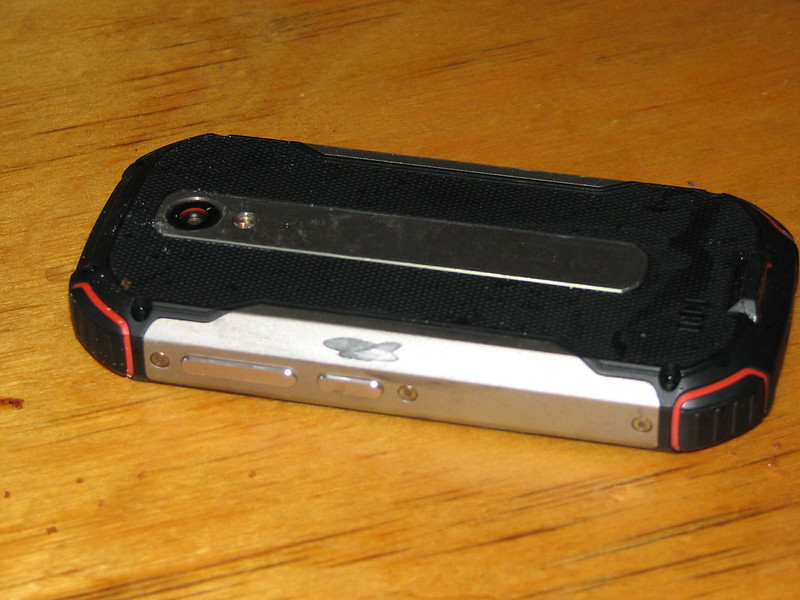 |
| Unihretz Atom L Smartphone case worn by washing machine |
The sound was a bit muffled due to water in the speaker vent, but with that out it worked fine. The grease appears to be part of the rubber coating, which was worn off when the phone became wedged between the rotating drum of the machine and a rubber seal.
I rinsed the phone in clean water and have left it in a plastic box with a low voltage fan and water absorbing sachets to dry out. I did not want to risk taking the phone apart, as being a rugged model has a lot of screws and gaskets.
 |
| Phone in a plastic box, with a fan and water absorbing sachets to dry out |
Monday, October 16, 2017
Jelly by Unihertz: Very Small Smartphone
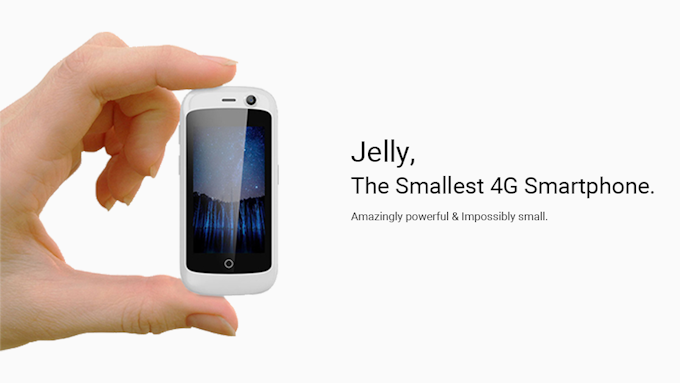
The phone arrived last week, along with the optional case. The Jelly phone has just one killer feature: it is small. Imagine a smartphone with a five-inch screen cut into quarters, and you have the Jelly (it has a 2.45-inch screen). The phone arrived well packaged, with a USB cable, European plug USB charger (which Unihertz sensibly has decided to leave out of regular sales, as there are so many USB chargers in the world) and a screen protector.
Apart from being small, the Jelly looks and works like any generic android smart phone (running Android 7.0 Nougat). Some reviewers have criticized the relatively low resolution 240 x 243 pixel screen, but I found it very clear and readable. The telephone sound quality is good, and the speaker-phone works very well. The battery, with moderate use and the WiFi and GPS, turned off, lasted just over two days, which is acceptable.
The phone's primary feature is also its only problem: size. The Jelly can be hard to hold up to an ear because there is not much to hold. I found the optional case makes it easier to hold, than the shiny, slippery plastic of the phone.
The screen is large enough to dial phone numbers and peck out a text message. But this is not the device for composing documents or reading ebooks. Think of it as a step up in power and functionality from a "feature" phone, in a package around the same size.
Ten years ago, when teaching web design for mobile devices at the Australian National University, I suggested the optimal screen size for a pocket-size device was about four inches (the size of a credit or business card). Such a screen is about the same width as a traditional newspaper column (so readable) and the device incorporating it is about the largest that can comfortably fit in the average pocket. Despite the fad for large phablets, around 4 inches is still a good size for smart phones.
At 2.45 inches the screen on the Jelly is just a bit too small for general use. The Samsung Galaxy J1 Mini, with its 4 inch screen, is a better general purpose smart-phone. But if you just want something to talk on, send text messages, and very occasionally, use an App, then the Jelly works very well.
What I would change
There are currently only two accessories for the Jelly: a case with a lanyard loop on top (which I have) and a case with an armband. The case works well but could be made of softer, more rubbery, material, to make it easier to hold. Also, there doesn't seem any good reason to have two different cases: why not just one with both a loop on top for a lanyard and a slot in the back for the armband?
ps: Unihertz shipped the Jelly by the promised date. But when they said "shipped" they meant it literally: they put the phones on a ship heading for Australia. It then took the phones a long time to get to Australia. You can order the full price Jelly now, and hopefully, it will arrive a bit quicker. ;-)
Monday, May 22, 2017
World's Smallest 4G Smartphone?

Motorola A760. This protects the screen when closed (but with the display visible through a transparent window). You could then answer a call by opening the flip and end it by closing. The cover has channels to take the sound from the speaker in the body of the phone up to your ear, making it more comfortable to hold.
Tuesday, March 01, 2016
Docking Phablets May Supplant Desktop Computers and Laptops

It should be noted that there are already generic docking stations for connecting Windows and Android smart phones to external displays and keyboards (you need a phone with MHL socket). Also there is the "NexDoc": a crowd funding project to make a laptop dock for smart phones (essentially a cheap generic laptop with the processor left out and a MHL cable added).
Sunday, December 29, 2013
Eco Rating of Mobile Phones

environmental and social impact of a phone, divided into Product (106 questions) and Corporate categories ( 56 questions). A separate scale is used for smartphones (much as different size fridges are rated separately for energy efficiency).
The top ratings for currently sold phones:
Feature phone: Nokia C2 - 01
Overall ECO 3.9:- Green design: 3.7
- Mobile phone life cycle: 4.3
- Company performance: 3.9
Smart phone: Nokia Lumia 720
Overall ECO 3.3:- Green design: 2.3
- Mobile phone life cycle: 3.6
- Company performance: 4.1
Thursday, April 11, 2013
Smartphone Mobile App Mapping APIs
Professor Hanan Samet, from University of Maryland, will speak on "Duking it out at the Smartphone Mobile App Mapping API Corral: Apple, Google, and the Competition", at the Australian National University in Canberra, 17 April 2013.
The recent introduction of the Apple iPhone 5 and the accompanying iOS6 software environment which, among other changes, replaced the use of the Google Maps API in iOS5 by Apple's own Maps API, has led to significant changes in the user experience with apps that make use of maps and has resulted in closer scrutiny of mapping applications on mobile devices. Many of these changes in the user experience deal with the quality of the data that is being produced and presented to the user, and has led to a wide ranging discussion of data quality and the seeming lack of quality assurance policies and protocols by Apple. These are widely documented in web postings. However, equally important are significant changes in the manner in which the data is presented to the user, but, surprisingly, not much attention has been paid to this aspect of the user experience which is somewhat analogous to the concept of the ``last mile'' when discussing the bandwidth of communications networks and its associated costs. The changes in the presentation and in the amount of data that are presented to the user on the Apple mapping platform, with an emphasis on mobile devices with a small form factor such as smartphones, are tabulated and compared along with other mapping platforms such as the iOS apps of ESRI, MapQuest, and OpenSeaMap (using the open source map data of OpenStreetMap), as well as Bing Maps and Nokia Maps for which no iOS app exists and thus the corresponding mobile web versions are used. Both the pre-iOS6 and post-iOS6 versions of the Google Maps API are included. * Best Paper Award, 1st ACM SIGSPATIAL International Workshop on Mobile Geographic Information Systems (MobiGIS 2012), Redondo Beach, CA, November 2012 ** Joint work with Brendan C. Fruin and Sarana Nutanong
Thursday, March 22, 2012
Mobile Learning in Canberra
The Gaggle, an informal group of educational designers in Canberra, ACT will next meet Thursday 29 March 4:30pm in Building H137b, Bruce Campus, Canberra Institute of Technology , on the theme Mobile Learning. I will be showing how I designed my ANU ICT Sustainability course notes to work on a mobile device.
We will be looking at snippets of how teachers are using Mobiles in the classroom. We will also be looking at mobile apps that can be used to support the teaching and learning process.Agenda.4:30 to 5:10 pm Mobile learning snippets.
- Nina Allen “Moblogs in Marketing”
- Sam Mills and Harry Stevensen “Integrating Mobile Phones in the Commercial Cookery kitchen”.
- Felicia Zhang “Record audio with mobile phones and upload to Moodle”
- Janet Harris “Using mobiles with ESL learners”.
- Other examples from ANU and UC?
5:10 to 5:40 Demonstration of Mobile apps useful for teachers.
- CamScanner which enables you to scan multipage documents and send to email in less than a minute.
- Evernote – notes and task manager which can be accessed from your PC, tablets and phones.
- Livescribe pens. (Felicia Zhang).
- Others include Paper Camera, Summly, iMovie, Instagram.
- Other useful apps?
5:40 to 6:15 NetworkingTime and PlaceThursday 29th March.H137b Bruce Campus (above the library).Go in the main entrance near the flag pole on Vowels Crescent.
Friday, February 03, 2012
Mobile Monday Sydney on M-Learning
I will be speaking at the first Mobile Monday Sydney for 2012, on "New Ways of Learning to Work: With E-books and E-Learning", in Sydney, 7:00 pm on Monday, 6 February 2012.
ps: My last talk for Mobile Monday was "Wireless Internet for Emergencies" for the MobileMonday Global Summit in Malaysia. This is being held in conjunction with the 2008 World Congress of Information Technology.
Also Dan Nolan from VTalk will be speaking on "VoIP via Mobile Phone" and Mark from Binu on "How to Make a Feature Phone Smarter using the Cloud".The Prime Minister announced extra funding for vocational training this week. This opens up new business opportunities for innovative e-learning via smart phones and tablet computers. Tom Worthington discusses his award winning "ICT Sustainability" course and how he uses e-books and on-line discussion forms to deliver globally accredited education to students worldwide:
1. New Government Funding for vocational education
2. Learn to Fight Climate Change With Your Mobile
3. Delivering courses in mobile formats
4. Getting students to work together on-lineSee also "Work-Integrated-Learning: With E-books and E-Learning".
ps: My last talk for Mobile Monday was "Wireless Internet for Emergencies" for the MobileMonday Global Summit in Malaysia. This is being held in conjunction with the 2008 World Congress of Information Technology.
Monday, January 02, 2012
Net for Safety When Setting Out on a Jet
Anthony Noack wrote of the problems of being without his computer when traveling in "Jet-setting with no safety net" (Sydney Morning Herald, December 29, 2011). It is curious to see someone discussing how to travel without a computer and Internet access. In 1994 I wrote about the novelty of travelling around Europe with a pocket computer and the Internet.
Anthony's Sony Ericsson netbook disk drive crashed and he found it was an uncommon model. One solution to this is to buy a low cost laptop which uses commonly available parts, rather than a high end model. When the disk in my Kogan Agora crashed (after I dropped it on a stone floor) I just had to remove one screw from the back, slide out the disk drive and slide in a new one (I chose a solid state unit for reliability).
With a new disk Anthony points out you will have no software. So he suggests carrying a USB flash drive with a boot-able Linux distribution, in your computer bag. But it is a good idea not to carry your backup in your computer bag, as if the bag is lost or stolen, you will have lost your backup as well as your computer. Put keep the backup in a bag separate form the computer. Also it is a good idea not to carry a computer bag when traveling, as it is a sign to thieves you have something worth stealing. Instead put the laptop in a padded sleeve and put that in your normal bag.
Instead of using Linux as a backup, it is easier to use it all the time. I gave up using Microsoft Windows several years ago and have found that the Linux open source alternative works well. For some functions, such as accounting, I now use web cloud based applications. As a result when my computer disk failed, I used the cloud versions of applications until I could get a new disk. Then I installed a new copy of Linux on the disk and copied the data back from the cloud (but I also keep a copy of my data on a removable device, just in case the on-line version and the laptop is lost).
Anthony's camera then failed, due to water. He pointed out that travelers might have their whole trip's photos stored on the camera. But the photos would normally be stored on a flash drive and you can have several of these and so loss of the camera should not result in loss of all your photos. Also you can upload the photos to an on-line site from a cyber cafe.
Anthony contemplated doing without gadgets so he would not need to carry power cords and battery chargers. But I find things are much simpler now as many gadgets now use USB for charging. So I can carry just one power supply for my laptop and use its three USB sockets as a plug-board for recharging the phone and other gadgets.
Anthony points out that Internet access makes travel easier for bookings on route. One solution would be a smart phone, rather than a laptop, which could also be used for taking photos (I used my old 2G phone for photos).
As Anthony points out, hard copies of critical documents are important. I put my passport, ID and credit cards down on a photocopier before I travel and make a couple of copies to take with me. It also helps to use an on-line travel planner, which has your itinerary and booking details (then print a copy to take with you). A neat printed itinerary can also help with suspicious immigration officials: if the see you have worked out where you are going and have booked, they are more likely to let you into their country.
Anthony's Sony Ericsson netbook disk drive crashed and he found it was an uncommon model. One solution to this is to buy a low cost laptop which uses commonly available parts, rather than a high end model. When the disk in my Kogan Agora crashed (after I dropped it on a stone floor) I just had to remove one screw from the back, slide out the disk drive and slide in a new one (I chose a solid state unit for reliability).
With a new disk Anthony points out you will have no software. So he suggests carrying a USB flash drive with a boot-able Linux distribution, in your computer bag. But it is a good idea not to carry your backup in your computer bag, as if the bag is lost or stolen, you will have lost your backup as well as your computer. Put keep the backup in a bag separate form the computer. Also it is a good idea not to carry a computer bag when traveling, as it is a sign to thieves you have something worth stealing. Instead put the laptop in a padded sleeve and put that in your normal bag.
Instead of using Linux as a backup, it is easier to use it all the time. I gave up using Microsoft Windows several years ago and have found that the Linux open source alternative works well. For some functions, such as accounting, I now use web cloud based applications. As a result when my computer disk failed, I used the cloud versions of applications until I could get a new disk. Then I installed a new copy of Linux on the disk and copied the data back from the cloud (but I also keep a copy of my data on a removable device, just in case the on-line version and the laptop is lost).
Anthony's camera then failed, due to water. He pointed out that travelers might have their whole trip's photos stored on the camera. But the photos would normally be stored on a flash drive and you can have several of these and so loss of the camera should not result in loss of all your photos. Also you can upload the photos to an on-line site from a cyber cafe.
Anthony contemplated doing without gadgets so he would not need to carry power cords and battery chargers. But I find things are much simpler now as many gadgets now use USB for charging. So I can carry just one power supply for my laptop and use its three USB sockets as a plug-board for recharging the phone and other gadgets.
Anthony points out that Internet access makes travel easier for bookings on route. One solution would be a smart phone, rather than a laptop, which could also be used for taking photos (I used my old 2G phone for photos).
As Anthony points out, hard copies of critical documents are important. I put my passport, ID and credit cards down on a photocopier before I travel and make a couple of copies to take with me. It also helps to use an on-line travel planner, which has your itinerary and booking details (then print a copy to take with you). A neat printed itinerary can also help with suspicious immigration officials: if the see you have worked out where you are going and have booked, they are more likely to let you into their country.
Wednesday, November 02, 2011
Google Motorola Droid Razr not a Flip Phone
 Motorola have announced a DROID RAZR android smart phone.
 The Motorola RAZR V3 of 2004,was a clamshell (flip) phone.
Unfortunately its 2011 namesake is not a flip phone. There appear to be few flip-phone Android smart phones available.
The Motorola A760, was a flip style smart phone. It would be reasonable to make an add-on smart phone flip cover.
Sunday, September 18, 2011
Android Smart Phones for Military Use
 The article "Infantry Innovation" Daniel Wasserbly, Janes Defence Weekly, 24 August 2011), discusses how the military can use smart phones on the battlefield. Mobile phones have been heavily used in support. Where there is no cell coverage available, mobile cell towers with satellite links can be used. Now consideration is being given to using the phones on the battlefield.
One option is to have a low power device to relay the mobile phone signals into the military radio network (much like the pico-cells now available for householders to boost mobile coverage). But this creates considerable security and support issues.
A simpler option is to use the smart phone as a terminal to the existing military radio. In this case the operator slips their civilian into a cradle with a cable plugged into a military radio. As well as providing power and data interface, the cradle protects the phone from damage. This approach should work well with the current crop of smart phones.
Smart phones (apart from the Apple iPhone) now mostly use the same standard micro-USB connector, for both charging and data. The connector is generally at the bottom centre of the phone, but some have it on the side, so a plug on a cable would be needed. It should therefore be possible to make a one-size-fits-all cradle to fit smart phones. This cradle would have an oversize case with a flexible transparent window on the front, like the Aqua Box Waterproof Smartphone Cases
 , so the touch screen can be used. Such a unit would be much larger than the custom cases for phones but still much more compact than the typical purpose built military terminal. The case would also be very cheap, being able to be mass produced, and sold for less than $100 retail. A similar, but larger case could be made for tablet computers.
There is much discussion in military circles of software development kits for running military applications, such as the US Amry Mobile/Handheld Computing Environment (M/HH CE). But the basic use for the smart phone will be to act as a web browser to remote applications. This requires no additional software and the same applications can be sued on tablet computers, smart phones, laptops and desktop computers.
Friday, June 03, 2011
Indonesia Overtaking Australia with Wireless Internet
Greetings from the famous room N101 at the at the Australian National University, where Dr Idris Sulaiman, is speaking on "ICT-enablement in Environmental Social Movements in Indonesia". He is describing the social changes that the Internet and social media are having in Indonesia. Facebook's second largest number of users are in Indonesia (after the USA). The rapid increase in urban Indonesia is causing problems with traffic but also providing benefits. There is an increase in fixed line telephones, but what is most interesting is the rapid rise in mobile phone use, to the point where it now exceeds that of developed nations.
The Mig33 social network has 45M users in Indonesia and is unusual in being a subscription based service, contrary to the conventional wisdom, which says few will pay and even fewer in a developing nation.
Facebook, Twitter and Mobile applications are being used by official Indonesian government agencies and also by NGOs for politics and fighting corruption. This has popularised the use of the technology in the public's mind.
There is strong competition for mobile phone call time in Indonesia, with this competition now driving down data charges as well. There are "office-in-a-box" products being offered and 4G wireless.
Dr Sulaiman described the work of NGOs working wireless technology to help local people be heard on environmental issues, including Telapak.
Dr Sulaiman describes Indonesia as a 'near-networked' nation. He argues that argues that ICT-enablement is now having a significant effect and that such developing nations with smart phones are bypassing development steps of western nations. The use of smart phones in Jakarta now exceeds that of Sydney. With more applications becoming avialable for smart phones and tablet computers, this may see developing nations in a better position to exploit the technology and take the lead globally in the information economy.
This has significant implications for Australia, which has invested $43B in a nationalised fibre optic National Broadband Network. It may be that Indonesia's free market wireless approach turns out to have been the better option. If most consumers and small businesses access the Internet via a hand held wireless device, then the rationale for the NBN evaporates. However, as Dr Sulaiman pointed out the wireless has capacity limitations and in Indonesia (and Australia to a lesser extent) latency and daily peak period cause problems. These limitations are likely to be acceptable for casual personal use but not for business.
The Mig33 social network has 45M users in Indonesia and is unusual in being a subscription based service, contrary to the conventional wisdom, which says few will pay and even fewer in a developing nation.
Facebook, Twitter and Mobile applications are being used by official Indonesian government agencies and also by NGOs for politics and fighting corruption. This has popularised the use of the technology in the public's mind.
There is strong competition for mobile phone call time in Indonesia, with this competition now driving down data charges as well. There are "office-in-a-box" products being offered and 4G wireless.
Dr Sulaiman described the work of NGOs working wireless technology to help local people be heard on environmental issues, including Telapak.
Dr Sulaiman describes Indonesia as a 'near-networked' nation. He argues that argues that ICT-enablement is now having a significant effect and that such developing nations with smart phones are bypassing development steps of western nations. The use of smart phones in Jakarta now exceeds that of Sydney. With more applications becoming avialable for smart phones and tablet computers, this may see developing nations in a better position to exploit the technology and take the lead globally in the information economy.
This has significant implications for Australia, which has invested $43B in a nationalised fibre optic National Broadband Network. It may be that Indonesia's free market wireless approach turns out to have been the better option. If most consumers and small businesses access the Internet via a hand held wireless device, then the rationale for the NBN evaporates. However, as Dr Sulaiman pointed out the wireless has capacity limitations and in Indonesia (and Australia to a lesser extent) latency and daily peak period cause problems. These limitations are likely to be acceptable for casual personal use but not for business.
Saturday, May 14, 2011
Buying a Smart Phone
 The replacement battery for my old phone is only providing about 20 minutes talk time and so does not get me through the day. This is a good excuse to buy a new phone, as the current model is so old genuine replacement parts are no longer available. I would like an Android (or other Linux) based smart phone, but not too big, or expensive. Also I would like a flip cover on it. I would prefer a flip phone, but I don't think anyone makes a smart flip phone (Motorola has made some in the past and for the China market).
My first choice would be the Huawei range, as they are cheap and get reasonable reviews. Also Huawei tends to use a standard version of Android, not adding its own custom software to cause problems.
The question is if the cheapest model in the range, Huawei Ideos u8150, will be sufficient. It gets good reviews and they are available for under $200 from Vodafone, my current phone provider (Dick Smith has the unit prepaid of Vodafone and unlocked). One catch is if I can used my Vodafone postpaid account with the prepaid phone.
The major issue with the low cost Ideos is with the size of the screen, which is only 2.8 inch, compared with the typical 4 inch screen of other smart phones. This makes for a more compact unit, although the case has a large section below the screen with buttons, making it larger than the screen would suggest. The Ideos has only a 240x320 pixel, QVGA resolution screen, much less than contemporary phones. But my current phone has a QVGA screen which is fine.
A step up is the Huawei Ideos X5. In some ways this is like the smaller model with a longer format screen (3.8 inches 800 x 480 pixels) filling more of the case (the X5 is only 6 mm wider, but 16 mm longer than the Ideos).
The Huawei Ideos X6 looks much more interesting. It has a slightly larger 4.1 Inch screen than the X5, but a much faster processor and HDMI output. It would be interesting to see if with a HDMI LCD screen, USB keyboard and mouse plugged in, if this could be used to replace a desktop computer. But at a cost of two to three times as much as the low cost model, it would seem to be more than I need in a phone.
Friday, April 15, 2011
UN cash for green phone app
The United Nations telecommunications agency is offering $10,000 for the most innovative mobile phone application about climate change.
Monday, January 24, 2011
Largest screen for a pocketable tablet computer is 6 inches
In "Largest screen for a smart phone" I suggested
a 4 inch screen was the largest which could be used for a easily hand held device: the size of a credit card: 85.60 × 53.98 mm (standardised as the ID-1 format). Following this approach the size for a larger, but still pocket size tablet computer would be the B7 size used for passports (ID-3 125 × 88 mm or 4.921 × 3.465 in).This would provide a 6 inch diagonal screen, assuming the screen went to the edge of the device.
It should be noted that B7 is approximately 4:3 ratio, which is squarer than the format used by many of the smart phones and tablet computers. The wider screens are useful for watching HDTV (16:9 format), but 4:3 is better for most information displays.
This suggests that the numerious 7 inch tablet computers are too large. But also devices such as the Dell Streak 5 smartphone/tablet PC with a 5 inch screen (5:3 aspect ratio) with a case (case: 152.9 × 79.1 mm or 6.02 x 3.11 inches) are not quite right either.
It should be noted that B7 is approximately 4:3 ratio, which is squarer than the format used by many of the smart phones and tablet computers. The wider screens are useful for watching HDTV (16:9 format), but 4:3 is better for most information displays.
This suggests that the numerious 7 inch tablet computers are too large. But also devices such as the Dell Streak 5 smartphone/tablet PC with a 5 inch screen (5:3 aspect ratio) with a case (case: 152.9 × 79.1 mm or 6.02 x 3.11 inches) are not quite right either.
Largest screen for a smart phone
In "Should the iPhone 5 get a larger screen?" (CNET
January 21, 2011 11:15 AM PST) David Carnoy asks if the iPhones 3.5 inch screen should be made larger to compete with 4 inch Android phones. He comments that some of the screens larger than 4 inches (such as the 4.3 inch EVO are "bulky"). When teaching web design for mobile devices to students in 2006 I had to consider how large a screen to design for. The larger the screen, the easier it was for the students to design for.
So I considered what ultimate limit there was on the size of a mobile phone screen. I decided the limiting factor was the size of the human hand, this was partly because the phone had to be comfortably held in the hand and also fit in a pocket (and pockets are sized to fit hands). But what size is a hand. In a flash of inspiration I considered the size of the typical credit card: 85.60 × 53.98 mm (standardised as the ID-1 format).
Allowing for margins, the height of a credit card is also about the same as the width of a newspaper column (1.83 inches or about 47 mm). That would suggest a reasonable amount of content could be displayed on a portrait format screen that size.
Credit cards are also about the same size of a business card. This seem reasonable, as both are designed to be held in the hand and fit in a wallet, which fits in a pocket. The wallet has to be a little larger than the cards it accommodates. So the size of a credit card seemed to be a natural maximum size for a hand held, pocket size device. This has a diagonal size of 101 mm (4 inches) and supports Mr. Carnoy's view that devices with screens bigger than 4 inches are clumsy.
ps: There is speculation in the Wikipedia about the origin of the size of a credit card. I suggest it derives from the human hand.
January 21, 2011 11:15 AM PST) David Carnoy asks if the iPhones 3.5 inch screen should be made larger to compete with 4 inch Android phones. He comments that some of the screens larger than 4 inches (such as the 4.3 inch EVO are "bulky"). When teaching web design for mobile devices to students in 2006 I had to consider how large a screen to design for. The larger the screen, the easier it was for the students to design for.
So I considered what ultimate limit there was on the size of a mobile phone screen. I decided the limiting factor was the size of the human hand, this was partly because the phone had to be comfortably held in the hand and also fit in a pocket (and pockets are sized to fit hands). But what size is a hand. In a flash of inspiration I considered the size of the typical credit card: 85.60 × 53.98 mm (standardised as the ID-1 format).
Allowing for margins, the height of a credit card is also about the same as the width of a newspaper column (1.83 inches or about 47 mm). That would suggest a reasonable amount of content could be displayed on a portrait format screen that size.
Credit cards are also about the same size of a business card. This seem reasonable, as both are designed to be held in the hand and fit in a wallet, which fits in a pocket. The wallet has to be a little larger than the cards it accommodates. So the size of a credit card seemed to be a natural maximum size for a hand held, pocket size device. This has a diagonal size of 101 mm (4 inches) and supports Mr. Carnoy's view that devices with screens bigger than 4 inches are clumsy.
ps: There is speculation in the Wikipedia about the origin of the size of a credit card. I suggest it derives from the human hand.
Sunday, January 09, 2011
Samsung Galaxy Tab
 Tesltra shops have the Samsung Galaxy Tab alongside the T-Touch Tab (a Tesltra branded Huawei Ideos Tablet S7). As befitting its much higher price than the Huawei, the Galaxy Tab feels much better made and is much faster in operation than the T-Touch. Its only fault is that it is a little heavy to hold in one hand and could benefit from a rubber case to make it easier to grip.
Using the tablet to look at my blog entry on pictograms for a fish and chip shop, I noticed that the icons were the right size for using as touch screen buttons. Using CSS I had made these 4 em square. The images were as high as four lines of text, making them about the same size as a 12.5mm standard finger.
Using CSS buttons which automatically resize for web pages in proportion with the text size would seem to be a way to get around different smartphone and tablet screen sizes and resolutions. Someone who has poorer eyesight and so uses a larger text is likely to also appreciate having larger buttons to press.

Saturday, December 04, 2010
Electronic Document and Records Management
Here is my attempted buzzword enriched rewrite of the description of the course COMP7420 Electronic Data Management.
Some proposed changes:
Some proposed changes:
- Course title: change to "Electronic Document and Records Management": the rationale for this is that "Electronic Data Management" is associated with the more techical aspects of the use of database systems. The EDRM term is more broadly applicable and of wide interest.
- Course Description: Remove mention of e-libraries, as librarians have not shown interest in the course.
- De-emphasise the technical: XML, XHTML HTML stuff: the students will still be doing it, but I will ease them into it gradually.
- Learning Outcomes: Remove all but one of the "describe" objectives and add an "evaluate" learning objective to make it higher order.
- Indicative Assessment: Replace the online quizzes and examination with a second assignment. Increase the Online Discussion from 20 to 24%. I am proposing to change the assessment method as it suits the material and also because I am confident in using the same assessment methods as for the Green ICT course. The forums and work based assignments worked particularly well with public servant students.
- Recommended Courses: At present it says: "Ability to use a computer. Experience in document use in the workplace.". That is a bit vague. Are there any formal definitions for these used by educators? For example for computer skills, I could specify the equivalent of International Computer Driving Licence (ICDL) Certification, but would anyone know what that is?
- Are there standard descriptions of workplace related study?
Electronic Document and Records Management COMP7420 - Details
| Offered By: | School of Computer Science | ||
| Academic Career: | Graduate Coursework | ||
| Course Subject: | Computer Science | ||
| Offered in: | Summer Session, 2011 | ||
| Unit Value: | 3 units | ||
| Course Description: | Government 2.0/Web 2.0, open access and social networking have created a demand for rapid access to information and greater involvement in the decision making of government, commercial and not-for-profit organisations. Smart phones and tablet computers using wireless networks allow mobile access to cloud computing resources world wide. This poses a challenge for organisations to provide access and input, while maintaining the security and integrity of records, the privacy of personal information. This course investigates how traditional records management techniques and document formats have been adapted to the Internet era. The use of web technology for practical e-commerce and e-publishing applications is emphasised using case studies, standards and guidelines of real organisations . Emphasis is placed on the information needs of the Australian Public Service, but is also applicable to the private sector. Identifying steps that can be taken to accelerate the uptake of electronic documents by government, in conjunction with small and medium-sized enterprises, this course enables the participant to learn practical skills for incorporating e-commerce into their organisation. The focus is on document representation, knowledge discovery, storage and retrieval. The areas covered include requirements, XML, XHTML, HTML metadata, data management. More information is on the course web page: http://cs.anu.edu.au/courses/COMP7420/. This course is offered subject to sufficient enrolments . | ||
| Learning Outcomes: |
Upon completion of this course, the student will be able to do the following:
| ||
| Indicative Assessment: |
| ||
| Course Classification(s): | Transitional courses are designed for students from a broad range of backgrounds and learning achievements, which provide for the acquisition of generic skills; or an informed understanding of contemporary issues; or fundamental knowledge for transition to Advanced or Specialist courses. | ||
| Areas of Interest: | Business Information Systems, Computer Science, and Information Technology | ||
Eligibility:
| |||
| Recommended Courses: | Ability to use a computer. Experience in document use in the workplace. | ||
| Consent Required: | Consent is required prior to enrolling in this course. | ||
| Technology Requirements: | Access to computer and Internet | ||
| Academic Contact: | tom.worthington(a)anu.edu.au |
Friday, September 17, 2010
World Congress By Smart Phone
The organisers of the World Computer Congress 2010 have provided a service for delegates with smart phones. This gives conference information about sessions, locations and times. The service also allows delegates to comment on sessions in a Twitter-like way. Each speaker was issued with an account so they can upload questions for their audience. The "Live Zone" for my presentation is now active (4PTR1200, 12 noon 23 September). This has a "Shout Box" for Twitter like comments, Speaker Polls (where I can ask questions) and "Presentation Evaluation Form" (where the audience can rate me). This is a good idea, but there are a few problems with the implementation.
What do I ask delegates?
When giving a presentation I don't usually expect to ask the audience questions: I expect them to ask me questions. Ideally the presentation is provided in advance, so delegates at read it and ask questions I can answer on the day (my presentation on Green ICT is online). So I will need a little more guidance as to what questions I can ask the audience.
Accessible Mobile Web Design
The mobile service for WCC2010 is separate to the main web site. I can understand the logic behind this, with the mobile service mainly for people at the event and introduced shortly before the opening of the congress. It would be very difficult to redo the entire web site a few days before the event to fit on a mobile phone. However, if designed for mobile access in the first place the main web site could have been a better design for everyone with a desktop browser, as well as being usable during the event on a smart phone.
The mobile site is in HTML5 (I checked it with the W3C Markup Validation service). Unfortunately it had some accessibility problems when tested with the TAW automated accessibility test: eight Priority 1, two Priority 2 and one Priority 3. Also it appears to have an excessive number of images for a small simple mobile page. The page scored only 70% on the W3C Mobile OK Checker. That is not a good score for a web page designed specifically for mobile phones.
What do I ask delegates?
When giving a presentation I don't usually expect to ask the audience questions: I expect them to ask me questions. Ideally the presentation is provided in advance, so delegates at read it and ask questions I can answer on the day (my presentation on Green ICT is online). So I will need a little more guidance as to what questions I can ask the audience.
Accessible Mobile Web Design
The mobile service for WCC2010 is separate to the main web site. I can understand the logic behind this, with the mobile service mainly for people at the event and introduced shortly before the opening of the congress. It would be very difficult to redo the entire web site a few days before the event to fit on a mobile phone. However, if designed for mobile access in the first place the main web site could have been a better design for everyone with a desktop browser, as well as being usable during the event on a smart phone.
The mobile site is in HTML5 (I checked it with the W3C Markup Validation service). Unfortunately it had some accessibility problems when tested with the TAW automated accessibility test: eight Priority 1, two Priority 2 and one Priority 3. Also it appears to have an excessive number of images for a small simple mobile page. The page scored only 70% on the W3C Mobile OK Checker. That is not a good score for a web page designed specifically for mobile phones.
Subscribe to:
Posts (Atom)